Our Short List of 3
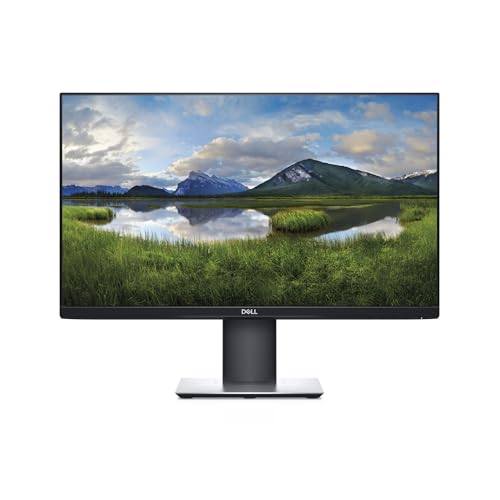
- Best for: Colour-accurate document and photo work.
- 24″ Full HD (1920 x 1080) IPS
- 60Hz refresh rate
- 1000:1 contrast
- 250 cd/m² brightness

- Best for: Everyday productivity on a simple home or study setup.
- 23.8″ Full HD (1920 x 1080)
- VA panel
- Matte screen
- Everyday productivity — working or learning

- Best for: A clean desk setup with built-in sound for video calls.
- 24″ FHD IPS (1920 x 1080)
- 300 nits brightness
- Anti-glare, flicker free, low blue light
- HDMI + VGA
All 4 Picks at a Glance
| Product | Specs | Action |
|---|---|---|
| Dell P2419H 24″ Monitor |
| Check price on Amazon |
| HP V24v G5 23.8″ Monitor |
| Check price on Amazon |
| HP Series 5 524da 24″ Monitor |
| Check price on Amazon |
 Dell P2425H 24″ Monitor |
| Check price on Amazon |
Key takeaways
- Five office computer monitors compared for spreadsheets, video calls, and long workdays — panels, eye comfort, stands, and ports that matter at a desk.
A monitor shapes every workday more than most desk gear does. Spreadsheets, email, video calls, and documents all pass through the same screen for hours, so the wrong choice shows up as tired eyes, a cramped layout, or a stand that never sits at the right height. The five monitors in this guide are office-class models picked from their Amazon listings for productivity first: clear text, comfortable viewing, and ports that connect to a work laptop without fuss.
Each pick below is a 24-inch-class Full HD monitor, a size that fits a standard desk while leaving room for a notebook or a second screen. The guide compares panel type, eye-comfort features, adjustability, and connectivity, then matches each model to a different kind of desk work, from all-day data entry to shared meeting rooms.
Quick Picks
As an Amazon Associate we earn from qualifying purchases
| Product | Best for | Key spec from title |
|---|---|---|
| Dell P2422H 24″ Monitor | All-day business use with eye comfort | 23.8″ Full HD IPS, ComfortView Plus |
| Dell P2419H 24″ Monitor | Colour-accurate document and photo work | 24″ Full HD IPS, 99% sRGB, 60Hz |
| HP V24v G5 23.8″ Monitor | Everyday productivity on a simple setup | 23.8″ Full HD, VA panel, matte screen |
| HP Series 5 524da 24″ Monitor | A clean, borderless desk with built-in sound | 24″ FHD IPS, 300 nits, 2W speakers |
| Dell P2425H 24″ Monitor | Smooth scrolling and a height-adjustable stand | 24″ Full HD IPS, 100Hz, height-adjustable |
How to Choose
Panel type and text clarity
An IPS panel keeps text sharp and colours steady when you lean back or glance from the side, which matters in an office where the screen is rarely viewed dead-on. Four of the five monitors here use IPS, so spreadsheets and documents stay readable across the panel. The HP V24v G5 uses a VA panel instead, a design that usually gives deeper blacks and stronger contrast for reading, though viewing angles can shift at the edges. Either panel works for office work, but if two or more people share one screen during meetings, IPS holds its image better. Check the panel type in the listing before buying, since two monitors that look identical on a desk can show text differently.
Screen size and desk space
All five monitors sit in the 24-inch class, a size that suits most desks without crowding a keyboard, a notebook, or a coffee mug. A 23.8-inch screen and a 24-inch screen are effectively the same size in daily use, so do not treat the small difference as a buying factor. What matters more is the stand footprint and the bezel: a slim-bezel model like the HP Series 5 leaves more usable desk space and looks tidier beside a second screen. Measure the depth of your desk before ordering, especially if the stand sits close to a wall, and leave room behind the monitor for cables. A screen that fits the desk is one you will actually enjoy using every day.
Eye comfort for long workdays
Eye comfort is easy to overlook and hard to ignore once a headache sets in. Look for a matte, anti-glare screen first, since reflections from windows and ceiling lights cause more strain than most people expect. Low blue light modes and flicker-free backlights help on long days, and both appear in the Dell P2425H and the HP Series 5 listings. Dell’s ComfortView Plus adds a low blue light filter to the P2422H and P2425H without a yellow tint. Height adjustment matters too: a screen that rises to eye level keeps your neck straight, while a fixed stand may need a stack of books underneath. Comfort features cost nothing in daily use and pay off across a working week.
Ports, stands, and daily setup
A monitor earns its place by connecting without adapters and sitting at the right height. HDMI and DisplayPort cover most work laptops, while VGA still helps older office machines, and the Dell models here carry all three. USB ports on the monitor keep a mouse receiver or a headset close at hand instead of reaching behind a desktop tower. Height adjustment, tilt, and swivel decide whether the screen meets your eyes or forces your neck down, so treat an adjustable stand as a feature rather than a bonus. Before ordering, check the ports on your laptop against the monitor’s inputs and count the cables you already own. A monitor that plugs straight in saves a later trip for an adapter.
The 5 Best Options
Dell P2422H 24″ Monitor
The Dell P2422H suits a business desk where the screen stays on from the first email to the last call. Its 23.8-inch Full HD IPS panel keeps text crisp across the whole display, and ComfortView Plus filters blue light without changing how documents look. A matte screen cuts reflections from overhead lights, which helps in bright open-plan offices. The stand and the wide port selection, DisplayPort, HDMI, USB, and VGA, mean it connects to almost any work machine without extra hardware. It is a straightforward office monitor built for long, quiet workdays rather than showy extras.
Specs
- 23.8″ Full HD (1920 x 1080) IPS
- ComfortView Plus
- Matte screen
- 1000:1 contrast
- DisplayPort / HDMI / USB / VGA
- Specific Uses For Product: Business
Best for: All-day business use in a bright office.
Watch out for: No refresh rate is stated in the listing, so do not expect a figure the listing does not give.
Dell P2419H 24″ Monitor
- Best for: Colour-accurate document and photo work.
- 24″ Full HD (1920 x 1080) IPS
- 60Hz refresh rate
- 1000:1 contrast
- 250 cd/m² brightness
Colour-accurate document and photo work.
The 60Hz refresh and 8ms response suit office tasks, not fast-paced motion.
The Dell P2419H is the pick for office work where colour matters, from marketing documents to photo-heavy reports. Its 24-inch Full HD IPS panel covers 99% sRGB, so colours on screen stay close to what a print or a client file shows. The 60Hz refresh and 8ms response suit documents, spreadsheets, and video calls rather than fast motion. An anti-glare coating and ComfortView keep the picture comfortable through long afternoons, and the 250 cd/m² brightness holds up in a lit room. Four input types, DisplayPort, VGA, HDMI, and USB, cover nearly every office machine.
Watch out for: The 60Hz refresh and 8ms response suit office tasks, not fast-paced motion.
HP V24v G5 23.8″ Monitor
- Best for: Everyday productivity on a simple home or study setup.
- 23.8″ Full HD (1920 x 1080)
- VA panel
- Matte screen
- Everyday productivity — working or learning
Everyday productivity on a simple home or study setup.
The listing gives few extra specs, so check the ports on your machine before ordering.
The HP V24v G5 keeps things simple for everyday productivity, and that simplicity is its strength. Its 23.8-inch Full HD VA panel shows documents and lessons clearly, and the matte screen keeps reflections down in a room with windows. The listing frames it for working or learning, which matches a home office, a study desk, or a shared family computer. With few extras to configure, it sets up quickly and stays out of the way. It is the right choice when the job is writing, reading, and browsing rather than colour-critical design or high-speed video.
Watch out for: The listing gives few extra specs, so check the ports on your machine before ordering.
HP Series 5 524da 24″ Monitor
- Best for: A clean desk setup with built-in sound for video calls.
- 24″ FHD IPS (1920 x 1080)
- 300 nits brightness
- Anti-glare, flicker free, low blue light
- HDMI + VGA
A clean desk setup with built-in sound for video calls.
This ASIN is a bundle that also ships with a Dockztorm USB hub; the hub is a separate add-on, not part of the monitor.
The HP Series 5 524da brings a tidier look to a desk that doubles as a workspace and a video-call station. Its 24-inch Full HD IPS panel runs at 300 nits with an anti-glare coating, so the picture stays bright in a sunlit room. Flicker-free backlighting and low blue light help during long calls, and the built-in 2W speakers handle meeting audio without a separate speaker on the desk. A three-sided borderless design and a tilt range of -5 to +25 degrees keep the setup neat and adjustable. It is a good fit for a small desk where every inch counts.
Watch out for: This ASIN is a bundle that also ships with a Dockztorm USB hub; the hub is a separate add-on, not part of the monitor.
Dell P2425H 24″ Monitor
- Best for: All-day office work with smooth scrolling and a stand that adjusts to eye level.
- 24″ Full HD (1920 x 1080) IPS
- 100Hz refresh rate
- ComfortView Plus, anti-glare
- Height-adjustable stand
All-day office work with smooth scrolling and a stand that adjusts to eye level.
This ASIN is a bundle that also ships with a USB-C cable and a cleaning kit; both are add-ons, not part of the monitor.
The Dell P2425H is the most adjustable monitor in this guide, and that flexibility shows in daily use. Its 24-inch Full HD IPS panel runs at 100Hz, so scrolling through long documents and timelines feels smoother than on a standard office screen. ComfortView Plus and an anti-glare coating keep the picture easy on the eyes, while a height-adjustable stand lifts the screen to eye level without a riser. HDMI, DisplayPort, and VGA cover modern and older machines alike. For anyone who spends the whole day at one screen, the extra adjustability is worth having.
Watch out for: This ASIN is a bundle that also ships with a USB-C cable and a cleaning kit; both are add-ons, not part of the monitor.
Which One Fits Your Situation
You work in a bright, shared office
Pick the Dell P2422H. Its matte screen and ComfortView Plus handle overhead lights and long hours, and the business framing matches a shared desk. The wide port selection means it connects to whichever machine is on the desk that day, from a new laptop to an older desktop. It is the least fussy choice when the screen simply needs to work for everyone.
You handle colour-sensitive documents
Pick the Dell P2419H. The 99% sRGB coverage keeps colours in marketing files and photo-heavy reports close to the original, and the IPS panel holds that colour when viewed from the side. Anti-glare and ComfortView keep long editing sessions comfortable. It is the monitor to choose when what you see on screen has to match what a client or a printer sees.
You want a simple setup for home or study
Pick the HP V24v G5. Its Full HD VA panel and matte screen cover writing, reading, and online lessons without extra features to learn or configure. The everyday-productivity framing fits a study desk or a shared family computer, where the monitor should just turn on and work. Keep expectations modest: this is a straightforward screen, not a colour-critical or high-speed display.
You need one screen for calls and all-day work
Pick the Dell P2425H for adjustability or the HP Series 5 524da for a tidier desk. The P2425H lifts to eye level and scrolls at 100Hz through long documents, while the Series 5 adds built-in speakers for calls and a borderless frame that suits a small desk. Either way, check the bundle contents first: the P2425H ships with a cable and cleaning kit, and the Series 5 ships with a USB hub, both as add-ons.
Common Mistakes
- Buying a gaming monitor for office work and paying for speed you will never use.
- Choosing a screen by size alone and ignoring the stand: a fixed stand at the wrong height causes neck strain within a week.
- Assuming every Full HD monitor has the same panel: IPS and VA show text and colour differently, so check the listing.
- Forgetting to match ports: a laptop with only USB-C needs an adapter if the monitor has HDMI and VGA only.
- Treating bundle add-ons as monitor features: a hub, a cable, or a cleaning kit in the box does not change the screen itself.
Frequently Asked Questions
Is a 24-inch monitor big enough for office work?
Yes, for most desk work. A 24-inch Full HD screen fits a spreadsheet, a document, and a chat window side by side without crowding the desk, and it leaves room for a notebook or a second screen. If you regularly compare three or more full windows at once, a second monitor or a larger screen may serve you better than one big panel alone.
What is the difference between IPS and VA panels?
An IPS panel keeps colours and brightness steady when viewed from an angle, which helps when colleagues gather around one screen. A VA panel usually shows deeper blacks and stronger contrast for reading text. Both work well for office tasks, so choose IPS for shared viewing and VA when you mostly sit straight in front of the screen alone.
Do I need a 100Hz monitor for office work?
No, but it can help. A 60Hz screen handles email, spreadsheets, and video calls without any problem, and most office monitors use it. A 100Hz panel, like the Dell P2425H, makes scrolling through long documents feel smoother. Treat it as a comfort bonus rather than a requirement, and do not trade panel quality or adjustability for refresh rate alone.
Are the bundle extras part of the monitor?
No. Two listings in this guide are bundles: the HP Series 5 524da ships with a Dockztorm USB hub, and the Dell P2425H ships with a USB-C cable and a cleaning kit. Those items arrive in the same box, but they are add-ons and do not change the monitor’s panel, ports, or stand. Judge each monitor on its own specs, and treat the extras as a convenience.
FAQ
Is a 24-inch monitor big enough for office work?
What is the difference between IPS and VA panels?
Do I need a 100Hz monitor for office work?
Are the bundle extras part of the monitor?
More from Amazon
Programs that pair well with the guide above. Offers and eligibility are set by Amazon and may change.
Free shipping on eligible items, Prime Video and more. Eligible new members can start with a free trial.
Start a Prime free trialAd-free music streaming. Eligible new subscribers can start with a free trial.
Try Music Unlimited freeA Prime membership for ages 18-24 with a trial period. Eligibility is set by Amazon.
See Prime for Young AdultsAudiobooks and podcasts to listen to on the go. Eligible new members can start with a free trial.
Try Audible freeAs an Amazon Associate we earn from qualifying purchases.