Our Short List of 3

- Best for: Daily video calls where a sharp QHD picture and a tidy single-cable desk matter most.
- 27-inch QHD (2560 x 1440) IPS panel
- 5MP pop-up webcam with Windows Hello infrared support
- Dual noise-cancelling microphones
- Two 5W built-in speakers

- Best for: Small desks and Zoom meetings where a compact screen with a certified call kit fits best.
- 23.8-inch Full HD (1920 x 1080) IPS panel
- 5MP pop-up webcam with tilt adjustment
- Dual echo-cancelling microphones
- Two 5W front-firing speakers

- Best for: Hybrid workers who want strong built-in audio and a full day of meetings without a headset.
- 23.8-inch Full HD (1920 x 1080) IPS panel
- 5MP Poly Studio pop-up webcam with tilt adjustment
- Dual microphones with AI noise reduction
- Four 3W down-firing speakers
All 3 Picks at a Glance
| Product | Specs | Action |
|---|---|---|
| Dell S2722DZ |
| Check price on Amazon |
| HP E24m G4 |
| Check price on Amazon |
| HP Series 5 Pro 524pm |
| Check price on Amazon |
Key takeaways
- Four video conferencing monitors with built-in webcams, microphones and speakers compared, so you can pick the right screen for calls and hybrid work.
A video conferencing monitor changes the shape of a workday because the camera, microphone and speakers live in the screen itself, so a call starts the moment the meeting link opens and nothing needs clipping on, plugging in or charging first. The choice that matters is not the panel alone but the whole call kit: how sharp the webcam looks in a dim room, how clearly the microphone picks up a voice from a normal sitting distance, and whether the speakers carry a colleague voice without a headset.
This guide covers four monitors built for that job, from a compact 24-inch screen for a small desk to a wide curved panel for a shared workspace, and every pick below comes from the details listed on its Amazon product page. The sections that follow explain what to check before buying, then match each screen to the desk and meeting load it suits best.
Quick Picks
As an Amazon Associate we earn from qualifying purchases
| Product | Best for | Key spec from title |
|---|---|---|
| Dell S2722DZ | Daily calls on a sharp QHD screen | 27-inch QHD, 5MP pop-up webcam |
| HP E24m G4 | Small desks and Zoom meetings | 23.8-inch FHD, Zoom Certified, 5MP webcam |
| HP Series 5 Pro 524pm | Hybrid workers who want strong audio | 23.8-inch FHD, 5MP webcam, four speakers |
| Dell P3424WEB | Wide multitasking during long meetings | 34-inch curved WQHD, 2K webcam |
How to Choose
Webcam quality and framing
The webcam decides how you look on every call, so look past the megapixel figure and check how the camera behaves in a real room. A pop-up camera hides the lens when the meeting ends and keeps the desk tidy, while a tilting lens lets you aim the frame at eye level instead of filming the ceiling. Infrared support adds Windows Hello sign-in, and features such as auto-framing and a wide field of view help when you lean back or share the frame with a colleague. A camera that only works in bright light will leave you dim and grainy in a home office after sunset.
Microphones and speakers
A conferencing monitor should carry both sides of the conversation, so check the microphone array as carefully as the camera. Dual microphones with noise reduction pick up a voice from a normal sitting distance and cut background hum from a fan or a keyboard, which matters in open rooms and shared flats. Built-in speakers need enough output to fill the desk area without distortion, and echo cancellation stops your own voice looping back to the other side. If the listing mentions neither echo handling nor a microphone mute control, plan on keeping a headset nearby for long calls.
USB-C docking and ports
One cable can replace a tangle of chargers and adapters when the monitor acts as a dock, but only when the USB-C port delivers enough power for the laptop attached to it. Check the wattage figure on the listing and compare it with the charger that came with the laptop, because a port that only carries video will leave the battery draining through a long meeting. An Ethernet port adds a wired connection for call stability, a daisy-chain output links a second screen, and a built-in KVM switch lets one keyboard and mouse serve two computers without replugging.
Panel size, resolution and ergonomics
Size and resolution decide how much of the meeting and the work around it fits on screen at once. A 24-inch Full HD panel suits a small desk and a single call window, a 27-inch QHD panel keeps text crisp when notes sit beside the video grid, and a wide curved panel holds a presentation, a chat window and the call itself side by side. The stand matters just as much: height, tilt, swivel and pivot adjustments put the camera at eye level, and that angle does more for how professional you look than any camera upgrade on its own.
The 4 Best Options
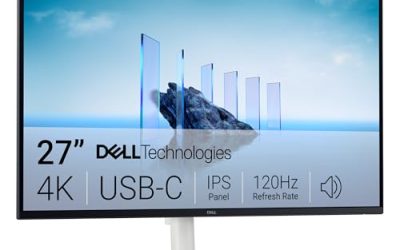
Dell S2722DZ
- Best for: Daily video calls where a sharp QHD picture and a tidy single-cable desk matter most.
- 27-inch QHD (2560 x 1440) IPS panel
- 5MP pop-up webcam with Windows Hello infrared support
- Dual noise-cancelling microphones
- Two 5W built-in speakers
Daily video calls where a sharp QHD picture and a tidy single-cable desk matter most.
Confirm it is still sold before buying. The pop-up camera does not tilt or swivel, so the stand height sets the framing.
The Dell S2722DZ is the straightforward pick for someone who spends most of the working day on video calls and wants a sharp picture without a complicated setup. Its 27-inch QHD panel keeps faces and shared documents clear at the same time, the pop-up webcam slides away when the meeting ends, and the dual microphones plus stereo speakers cover the audio side without extra hardware on the desk. A single USB-C cable carries video and charges the laptop, so the whole station stays tidy.
Watch out for: Confirm it is still sold before buying. The pop-up camera does not tilt or swivel, so the stand height sets the framing.
HP E24m G4
- Best for: Small desks and Zoom meetings where a compact screen with a certified call kit fits best.
- 23.8-inch Full HD (1920 x 1080) IPS panel
- 5MP pop-up webcam with tilt adjustment
- Dual echo-cancelling microphones
- Two 5W front-firing speakers
Small desks and Zoom meetings where a compact screen with a certified call kit fits best.
Confirm it is still sold before buying. Full HD resolution feels tight when several windows share the screen at once.
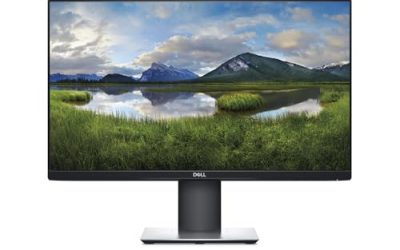
The HP E24m G4 suits a compact desk where a conferencing screen must earn its place without crowding the workspace. Its 23.8-inch Full HD panel is large enough for a call grid and a notes window, the 5MP webcam pops up with a tilt adjustment for a flattering angle, and the dual echo-cancelling microphones pair with front-firing speakers for clear two-way sound. Zoom Certification on the listing signals that the camera, microphones and speakers passed that platform’s checks for meeting use.
Watch out for: Confirm it is still sold before buying. Full HD resolution feels tight when several windows share the screen at once.
HP Series 5 Pro 524pm
- Best for: Hybrid workers who want strong built-in audio and a full day of meetings without a headset.
- 23.8-inch Full HD (1920 x 1080) IPS panel
- 5MP Poly Studio pop-up webcam with tilt adjustment
- Dual microphones with AI noise reduction
- Four 3W down-firing speakers
Hybrid workers who want strong built-in audio and a full day of meetings without a headset.
Confirm it is still sold before buying. The webcam must be popped up by hand before each call, so build that step into the routine.
The HP Series 5 Pro 524pm is the pick for hybrid workers who run back-to-back meetings and would rather leave the headset in a drawer. Its Poly Studio 5MP webcam pops up with a tilt adjustment, the microphones use AI noise reduction to cut room sound, and four down-firing speakers give voices more body than the usual pair of small drivers. USB-C carries video, data and laptop charging through one cable, and the stand adjusts in every direction so the camera sits at eye level through a long day of calls.
Watch out for: Confirm it is still sold before buying. The webcam must be popped up by hand before each call, so build that step into the routine.
Dell P3424WEB
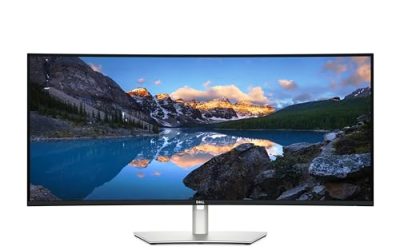
The Dell P3424WEB turns a meeting screen into a workspace, with a wide curved panel that holds the call, a presentation and a chat window side by side. Its 2K webcam uses a large sensor with auto-framing and a privacy shutter, the dual echo-cancelling microphones and dual speakers handle the audio, and USB-C delivers laptop charging alongside a wired Ethernet connection for call stability. A built-in KVM switch shares one keyboard and mouse between two computers, which suits a desk that mixes a work laptop with a personal machine.
Specs
- 34-inch curved WQHD (3440 x 1440) IPS panel, 3800R curvature
- 4MP RGB plus IR 2K webcam with auto-framing
- Dual echo-cancelling microphones
- Two 5W built-in speakers
- USB-C with 90W power delivery
- RJ-45 Ethernet and built-in KVM switch
- 60Hz refresh rate and 300 nits brightness
Best for: Long meetings where a wide curved screen keeps the call, notes and chat visible at once.
Watch out for: Confirm it is still sold before buying. Dell’s own store lists this model as unavailable, so check the Amazon listing carefully, and measure the desk first because the wide panel needs real depth.
Which One Fits Your Situation
You take calls all day from a small desk
The HP E24m G4 fits this desk best because its 23.8-inch panel leaves room for a notebook and a coffee cup while the pop-up webcam, dual microphones and front speakers cover the whole call. Its Zoom Certification gives extra confidence for platform meetings, and the single USB-C cable keeps the small surface free of clutter.
You want the sharpest picture for client-facing calls
The Dell S2722DZ suits client-facing work because the 27-inch QHD panel renders faces and shared documents with more detail than a Full HD screen, and the 5MP pop-up webcam pairs with noise-cancelling microphones for a clean, professional presence. Set the stand so the camera sits at eye level and the picture does the talking.
You run back-to-back meetings and hate headsets
The HP Series 5 Pro 524pm is the pick here because four speakers and AI noise reduction microphones carry long meeting days without anything pressing on the ears. Its 100W USB-C charging keeps a laptop topped up through the schedule, and the fully adjustable stand prevents neck strain as the calls pile up.
You share your screen and juggle windows during calls
The Dell P3424WEB earns this slot because the 34-inch curved panel fits the call grid, the deck and the chat side by side without constant window switching. The 2K webcam with auto-framing keeps the presenter centred while moving, and the KVM switch shares one keyboard between the work laptop and a second machine.
Common Mistakes
- Buying a monitor with a webcam but no built-in microphone, then discovering the laptop mic must stay open and picks up keyboard noise.
- Assuming every USB-C port charges a laptop, when some only carry video and leave the battery draining through a long meeting.
- Choosing a screen by size alone and forgetting that a fixed camera films from below the chin unless the stand lifts it to eye level.
- Skipping the meeting platform check, so a monitor bought for Teams calls turns out to lack the certification or controls the team relies on.
- Placing the monitor against a bright window, which forces the webcam to expose for the light behind and leaves the face in shadow.
Frequently Asked Questions
Do I still need a headset with a conferencing monitor?
Most callers can leave the headset aside because the monitors in this guide combine dual microphones with built-in speakers and echo handling. A headset still helps in a noisy shared room, for confidential calls, or when the microphone must sit close to the mouth, so keep one nearby for those moments rather than wearing it all day.
Is a built-in webcam good enough for client calls?
A 4MP or 5MP built-in webcam with a large sensor and good lighting looks clean and professional on client calls, especially when the camera sits at eye level. The picture suffers most from poor lighting and a low angle, so a lamp facing the desk and a raised stand improve the image more than a separate camera would.
Can one USB-C cable run the whole setup?
One USB-C cable can carry video, data and laptop charging when the monitor supports power delivery at a wattage that matches the laptop charger. Check the wattage on the listing before buying, and use the cable that ships with the monitor, because an older or shorter cable may carry video without charging.
Does a conferencing monitor work with Zoom, Teams and Meet?
These monitors behave as a standard webcam, microphone and speaker set, so they work across Zoom, Teams and Meet without special software. Platform certification, where the listing states it, means the manufacturer put that model through the platform’s own audio and video checks, which adds confidence but is not a requirement for joining a call.
FAQ
Do I still need a headset with a conferencing monitor?
Is a built-in webcam good enough for client calls?
Can one USB-C cable run the whole setup?
Does a conferencing monitor work with Zoom, Teams and Meet?
More from Amazon
Programs that pair well with the guide above. Offers and eligibility are set by Amazon and may change.
Free shipping on eligible items, Prime Video and more. Eligible new members can start with a free trial.
Start a Prime free trialAd-free music streaming. Eligible new subscribers can start with a free trial.
Try Music Unlimited freeA Prime membership for ages 18-24 with a trial period. Eligibility is set by Amazon.
See Prime for Young AdultsAudiobooks and podcasts to listen to on the go. Eligible new members can start with a free trial.
Try Audible freeAs an Amazon Associate we earn from qualifying purchases.