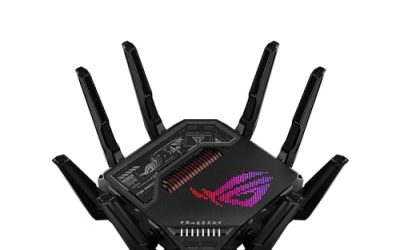
Our Short List of 3

- Best for: A large two-story home where the router sits downstairs and the bedrooms are upstairs.
- AC3200 dual-band Wi-Fi, 600 Mbps at 2.4 GHz and 2600 Mbps at 5 GHz
- Tri-Stream 160 technology with MU-MIMO
- 1.8 GHz dual-core processor, 512MB RAM and 256MB flash
- Four adjustable external antennas
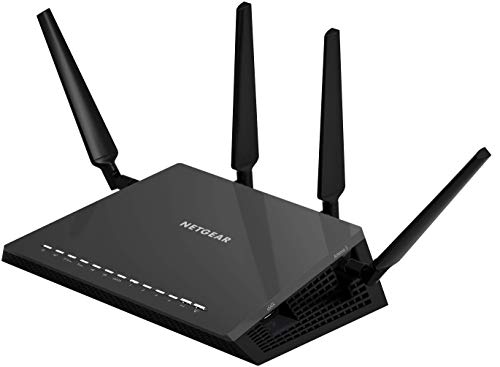
- Best for: A two-story home where a single router must reach the floor above.
- AC2600 dual-band Wi-Fi, 800 Mbps at 2.4 GHz and 1733 Mbps at 5 GHz
- 1.7 GHz dual-core processor with 512MB RAM
- MU-MIMO Quad Stream technology
- Four external antennas

- Best for: A mid-size two-story home that wants proven DD-WRT support.
- AC1900 dual-band Wi-Fi, 600 Mbps at 2.4 GHz and 1300 Mbps at 5 GHz
- Five Gigabit Ethernet ports
- One USB 3.0 port and one USB 2.0 port
- Three external antennas
All 5 Picks at a Glance
| Product | Specs | Action |
|---|---|---|
| Linksys WRT3200ACM |
| Check price on Amazon |
| NETGEAR Nighthawk X4S R7800 |
| Check price on Amazon |
| ASUS RT-AC68U |
| Check price on Amazon |
 NETGEAR Nighthawk R7000 |
| Check price on Amazon |
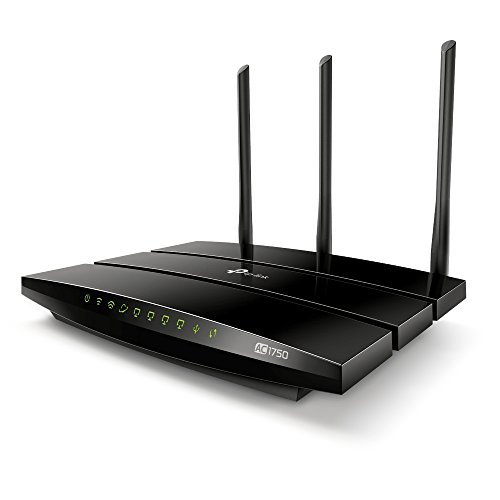 TP-Link Archer C7 |
| Check price on Amazon |
Key takeaways
- Five DD-WRT routers for two-story homes compared, from the AC3200 Linksys WRT3200ACM to the six-antenna TP-Link Archer C7, with placement and revision checks.
A two-story home turns router shopping into a coverage problem before it becomes a speed problem. The signal has to cross a floor, not just a room, and the 5 GHz band that feels fast beside the router fades quickly through ceilings and joists. DD-WRT adds a second decision on top of that: the router must accept a DD-WRT build for its exact model and hardware revision, or the firmware you bought it for will never install.
This guide is for households spread across two floors, for people whose bedrooms sit above the living room router, and for anyone who wants DD-WRT controls such as per-device rules and detailed traffic shaping without giving up upstairs coverage. Every router below is backed by DD-WRT support evidence for its model, and every specification comes from the Amazon listing for that exact model.
Quick Picks
As an Amazon Associate we earn from qualifying purchases
| Product | Best for | Key spec from title |
|---|---|---|
| Linksys WRT3200ACM | The biggest two-story homes | AC3200 dual-band with four adjustable antennas |
| NETGEAR Nighthawk X4S R7800 | A router on one floor reaching the other | AC2600 dual-band with four external antennas |
| ASUS RT-AC68U | A mid-size two-story home | AC1900 dual-band with five Gigabit ports |
| NETGEAR Nighthawk R7000 | A first DD-WRT flash on a smaller budget | AC1900 with three high-power external antennas |
| TP-Link Archer C7 | A smaller two-story home | AC1750 dual-band with six antennas |
How to Choose
Start with coverage, not headline speed
Headline wireless numbers describe a single room with a clear line of sight, and a two-story home rarely offers either. The 5 GHz band is fast but weak through ceilings, so the 2.4 GHz band does most of the work upstairs, and a router with more external antennas and stronger amplifiers will reach the far bedroom better than a faster router with small internal antennas. Place the router as high as practical on the ground floor, near the stairwell or the center of the house, and expect the farthest upstairs corner to be the weakest spot. If that corner matters, plan for a wired access point rather than hoping a single radio will cover it.
Confirm DD-WRT support for the exact model and revision
DD-WRT support is decided model by model and revision by revision, not by brand or by wireless class. Two routers with the same name can carry different chips inside, and a build that works on one revision can brick another, so check the DD-WRT supported-devices list and the router database for the exact model number printed on the box. Read the hardware revision on the label before ordering, and treat a listing that hides the revision as a warning sign. A router that never takes DD-WRT is just an ordinary router, no matter how good its stock firmware looks, and returning one after a failed flash wastes more time than the check takes.
Match the processor and memory to what DD-WRT will run
A router that only routes can get by on modest hardware, but DD-WRT turns the router into a small server, and the processor and memory decide how much of that server you can use. Features such as a VPN client, quality-of-service rules and per-device controls all take processor time, and encrypted traffic in particular will crawl on a weak chip. Look for a dual-core processor and at least 256MB of RAM if you plan to run a VPN or heavy traffic shaping, and check the flash size too, since larger DD-WRT builds will not fit on routers with only a few megabytes of flash. Buying a stronger chip costs little extra and keeps the firmware from becoming the bottleneck.
Check ports, USB sharing and what stays behind after flashing
Wired connections still matter in a two-story home, because a cable through the floor beats any wireless signal trying to cross it. Count the Gigabit Ethernet ports against the devices you plan to wire in, such as a desktop, a console and a television, and remember that one port is taken by the modem connection. A USB port adds shared storage or a printer without another device on the network, and it is worth having on a router that will serve the whole house. Flashing DD-WRT also removes the stock app and cloud features, so confirm before buying that the features you would lose are ones you are happy to give up.
The 5 Best Options
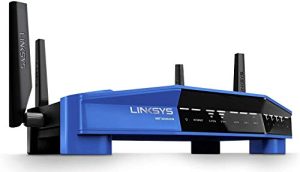
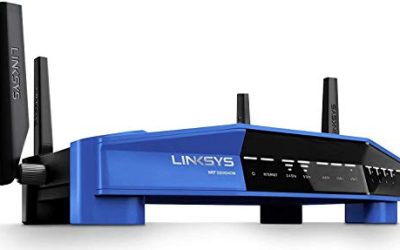
Linksys WRT3200ACM
- Best for: A large two-story home where the router sits downstairs and the bedrooms are upstairs.
- AC3200 dual-band Wi-Fi, 600 Mbps at 2.4 GHz and 2600 Mbps at 5 GHz
- Tri-Stream 160 technology with MU-MIMO
- 1.8 GHz dual-core processor, 512MB RAM and 256MB flash
- Four adjustable external antennas
A large two-story home where the router sits downstairs and the bedrooms are upstairs.
Confirm it is still sold before buying. Check the exact model and hardware revision against the DD-WRT support list before flashing, since builds are revision-specific.
The WRT3200ACM is the strongest pick when the house itself is the problem. Four adjustable external antennas and Tri-Stream 160 give the 5 GHz band real reach, while the 2.4 GHz band carries through the floor to rooms the faster band cannot reach. A 1.8 GHz dual-core processor keeps DD-WRT features such as traffic shaping and per-device rules running without slowing the network, and the open-source-ready design means DD-WRT builds are documented for this exact model. It suits a large two-story home where the router lives downstairs and the bedrooms sit above it.
NETGEAR Nighthawk X4S R7800
- Best for: A two-story home where a single router must reach the floor above.
- AC2600 dual-band Wi-Fi, 800 Mbps at 2.4 GHz and 1733 Mbps at 5 GHz
- 1.7 GHz dual-core processor with 512MB RAM
- MU-MIMO Quad Stream technology
- Four external antennas
A two-story home where a single router must reach the floor above.
Confirm it is still sold before buying. Some retailers list this model as discontinued, so check the listing for new stock and confirm the R7800-100NAS model number before ordering.
The Nighthawk X4S R7800 is the pick for a two-story home where one router has to do the work of two. Its AC2600 wireless and four external antennas push a strong signal through the ceiling to the floor above, and the 1.7 GHz dual-core processor has the headroom for DD-WRT extras such as a VPN client and quality-of-service rules. Four Gigabit Ethernet ports cover wired rooms downstairs, and the router is listed as supporting DD-WRT as well as OpenWrt, so the firmware path is documented rather than guessed. It fits households that stream and game on both floors at once.
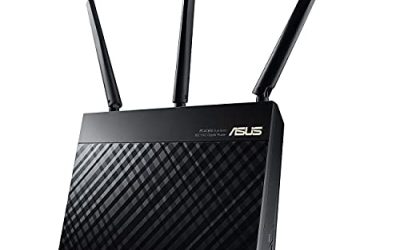
ASUS RT-AC68U
- Best for: A mid-size two-story home that wants proven DD-WRT support.
- AC1900 dual-band Wi-Fi, 600 Mbps at 2.4 GHz and 1300 Mbps at 5 GHz
- Five Gigabit Ethernet ports
- One USB 3.0 port and one USB 2.0 port
- Three external antennas
A mid-size two-story home that wants proven DD-WRT support.
Confirm it is still sold before buying. Check the seller and the exact RT-AC68U variant, since later revisions changed hardware under the same name.
The RT-AC68U is the sensible middle of this list, with enough wireless muscle for a mid-size two-story home and a long DD-WRT history behind it. Three external antennas and AC1900 dual-band wireless carry the signal upstairs, while five Gigabit Ethernet ports handle wired devices in the rooms nearest the router. One USB 3.0 port and one USB 2.0 port add storage and printer sharing, and the listing states the model is not discontinued by the manufacturer. It suits a household that wants proven DD-WRT support without paying for the fastest hardware on this list.
NETGEAR Nighthawk R7000
- Best for: A first DD-WRT flash in a two-story home on a smaller budget.
- AC1900 dual-band Wi-Fi, 600 Mbps at 2.4 GHz and 1300 Mbps at 5 GHz
- 1 GHz dual-core processor, 256MB RAM and 128MB flash
- Three external antennas with high-power amplifiers
- Beamforming for more reliable connections
A first DD-WRT flash in a two-story home on a smaller budget.
Confirm it is still sold before buying. The model is older and some sellers list used or refurbished units, so check that the listing is for a new R7000-100NAS.
The Nighthawk R7000 is the easiest first step into DD-WRT for a two-story home. Three external antennas with high-power amplifiers give the AC1900 signal a fair chance of reaching the upper floor, and Beamforming focuses the signal toward connected devices instead of spraying it in every direction. A 1 GHz dual-core processor handles DD-WRT features well enough for a family network, and five Gigabit Ethernet ports plus USB 3.0 and USB 2.0 cover wired gear and shared storage. It fits a household that wants to try DD-WRT without spending on flagship hardware.
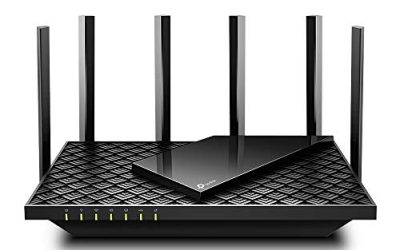
TP-Link Archer C7
- Best for: A smaller two-story home where the router can sit near the center.
- AC1750 dual-band Wi-Fi, 450 Mbps at 2.4 GHz and 1300 Mbps at 5 GHz
- Six antennas
- Four Gigabit Ethernet ports and one Gigabit WAN port
- One USB 2.0 port
A smaller two-story home where the router can sit near the center.
Confirm it is still sold before buying. Check the hardware version before flashing, since early versions handle the 5 GHz band differently under DD-WRT.
The Archer C7 is the cheapest way onto this list, and it still brings the antenna count a two-story home needs. Six antennas spread the dual-band signal across both floors, and AC1750 wireless is enough for streaming and browsing upstairs once the router is placed well. Four Gigabit Ethernet ports cover wired devices, and DD-WRT builds exist for several hardware versions of this model, which is why it has stayed a popular first flash for years. It suits a smaller two-story home where the router can sit near the middle of the house.
Which One Fits Your Situation
Your router sits downstairs and the bedrooms are upstairs
Pick the Linksys WRT3200ACM. Its four adjustable antennas and Tri-Stream 160 give the strongest signal in this list, and the 2.4 GHz band carries through the floor to rooms the 5 GHz band cannot reach. The 1.8 GHz processor also keeps DD-WRT features running smoothly while the whole household is online at once.
You stream and game on both floors at the same time
Pick the NETGEAR Nighthawk X4S R7800. Its AC2600 wireless and MU-MIMO handle several devices streaming and gaming at once, and the 1.7 GHz dual-core processor has the headroom for DD-WRT traffic shaping that keeps one device from crowding out the rest. Four Gigabit ports cover wired consoles, televisions and desktops downstairs.
You have never flashed custom firmware before
Pick the ASUS RT-AC68U or the NETGEAR Nighthawk R7000. Both have long DD-WRT histories, so the builds and the guides for their exact revisions are easy to find, and both are forgiving first flashes compared with newer hardware. The RT-AC68U suits a mid-size home, while the R7000 costs less and still reaches the upper floor.
You want the lowest spend that still covers two floors
Pick the TP-Link Archer C7. Six antennas give it more reach than its wireless class suggests, and AC1750 is enough for streaming and browsing upstairs when the router sits near the center of the house. Just check the hardware version against the DD-WRT list first, since early versions treat the 5 GHz band differently.
Common Mistakes
- Buying a router for its headline wireless number and ignoring how many antennas it has and where they point
- Flashing DD-WRT without checking the exact model and hardware revision first
- Putting the router in a corner cupboard downstairs and expecting the signal to reach the far upstairs bedroom
- Choosing the 5 GHz band for every device, even the ones two floors away that the 2.4 GHz band would serve better
- Forgetting that flashing removes the stock app and cloud features, then missing them afterwards
Frequently Asked Questions
Can any router run DD-WRT?
No. DD-WRT supports specific models and hardware revisions, and a router outside that list cannot take the firmware at all. Check the DD-WRT supported-devices list and router database for your exact model number before buying, and read the hardware revision on the box label, since two routers with the same name can carry different chips inside.
Where should I place the router in a two-story home?
Put it high on the ground floor, near the center of the house or close to the stairwell, so the signal has the shortest path through the ceiling to the rooms above. Keep it out of closed cupboards and away from thick walls, mirrors and large metal objects, and avoid placing it at the far end of the house, which leaves the opposite upstairs corner with the weakest signal.
Will DD-WRT fix dead spots upstairs?
Not by itself. DD-WRT gives you better control over channels, transmit power and traffic, and those controls can improve a weak upstairs signal, but no firmware can push a radio signal through several floors and walls that block it. If a room stays dead after placement and channel changes, the fix is a wired access point on the upper floor, not another firmware setting.
Do I need a mesh system instead of one DD-WRT router?
Not always. A single strong router with good antennas covers many two-story homes, especially when it sits near the center and the upstairs rooms are directly above it. Mesh makes sense when the house is large, the walls are thick, or one router leaves a whole wing without signal, and in that case a DD-WRT router can still serve as the main unit with wired access points upstairs.
FAQ
Can any router run DD-WRT?
Where should I place the router in a two-story home?
Will DD-WRT fix dead spots upstairs?
Do I need a mesh system instead of one DD-WRT router?
More from Amazon
Programs that pair well with the guide above. Offers and eligibility are set by Amazon and may change.
Free shipping on eligible items, Prime Video and more. Eligible new members can start with a free trial.
Start a Prime free trialAd-free music streaming. Eligible new subscribers can start with a free trial.
Try Music Unlimited freeA Prime membership for ages 18-24 with a trial period. Eligibility is set by Amazon.
See Prime for Young AdultsAudiobooks and podcasts to listen to on the go. Eligible new members can start with a free trial.
Try Audible freeAs an Amazon Associate we earn from qualifying purchases.