Our Short List of 3

- Best for: M1 owners who want one full-size backlit board for long typing days and three-device switching.
- Full-size wireless keyboard with a Mac key layout
- Backlit keys that light up as hands approach and adapt to ambient light
- Bluetooth Low Energy pairing with up to 3 devices on macOS, iPadOS and iOS
- USB-C rechargeable with a 10-day battery life with backlighting on

- Best for: M1 owners who dock their MacBook Pro and want Touch ID plus a numeric keypad on the desk.
- Touch ID for fast, easy and secure authentication for logins and to unlock your Mac
- Extended layout with document navigation controls for quick scrolling and full-size arrow keys
- Numeric keypad, ideal for spreadsheets and finance applications
- Wireless Bluetooth connection with a rechargeable battery lasting about a month or more

- Best for: M1 owners who prefer mechanical keys, a compact desk and a board they can remap and customise.
- 75 percent layout with 84 keys and a Super Brown switch
- White LED backlight, rechargeable, wired and Bluetooth
- Bluetooth 5.2 connection to up to 3 devices
- QMK firmware with key remapping through the Keychron Launcher web app
All 3 Picks at a Glance
| Product | Specs | Action |
|---|---|---|
| Logitech MX Keys S for Mac, Space Grey |
| Check price on Amazon |
| Apple Magic Keyboard with Touch ID and Numeric Keypad, Black Keys |
| Check price on Amazon |
| Keychron K2 QMK Wireless Mechanical Keyboard, Version 3 |
| Check price on Amazon |
Our Top Picks
- Logitech MX Keys S Mac Wireless Keyboard FluidFull Size16.94 x 5.18 x 0.81 inches2.4 poundsCheck on Amazon
The MacBook Pro M1 has a good built-in keyboard, but long days at a desk call for a full-size external board with a steadier angle, a numeric keypad or a calmer key feel. The right board turns the laptop into a comfortable workstation. The M1 adds two wrinkles: Bluetooth keeps the laptop’s two Thunderbolt ports free for a display and storage, and Touch ID on an external keyboard only works with Apple silicon Macs, which the M1 is.
This guide covers three kinds of MacBook Pro M1 owners: desk writers who want a quiet full-size board with Mac-labelled keys, M1 owners who dock their laptop with the lid closed and want Touch ID on the desk, and typists who prefer a compact mechanical board. The Logitech MX Keys S for Mac brings a low-profile backlit design with three-device switching, the Apple Magic Keyboard adds Touch ID with a numeric keypad, and the Keychron K2 Version 3 pairs a 75 percent layout with a hot-swappable Super Brown switch.
Quick Picks
As an Amazon Associate we earn from qualifying purchases
| Product | Best for | Key spec from title |
|---|---|---|
| Logitech MX Keys S for Mac, Space Grey | All-day desk typing | Backlit, Bluetooth, USB-C rechargeable |
| Apple Magic Keyboard with Touch ID and Numeric Keypad, Black Keys | Docked M1 with Touch ID | Touch ID, numeric keypad, Bluetooth |
| Keychron K2 QMK Wireless Mechanical Keyboard, Version 3 | Compact mechanical typing | 75 percent layout, Super Brown switch, white LED backlight |
How to Choose
Mac Layout and Touch ID
A keyboard made for Mac puts Command and Option where your thumbs expect them, and it labels the function row with brightness, volume and media controls that macOS actually uses. A Windows-layout board forces you to remap keys or live with printed labels that lie. Touch ID is the other Mac-only feature worth weighing: it unlocks the Mac, approves purchases and fills passwords from the keyboard, but it only works on Apple silicon Macs, so the M1 qualifies while older Intel machines do not. If you dock your MacBook Pro M1 with the lid closed, Touch ID on the desk board is the closest thing to the laptop’s own sensor.
Connection: Bluetooth, Multi-Device, and a Wired Backup
The 13-inch MacBook Pro M1 has only two Thunderbolt ports, so a Bluetooth keyboard is worth more here than on a desktop: it leaves both ports free for a monitor, a hub or external storage. Look for Bluetooth that pairs with up to three devices, so the same board can switch between the MacBook, an iPad and a phone. A wired USB-C mode is a useful backup for the moments Bluetooth misbehaves, and it also charges the battery while you type. One caution applies to every Bluetooth board: if FileVault is enabled, macOS may not accept password entry over Bluetooth at boot, so keep the laptop keyboard handy for that first unlock.
Key Feel and Noise
Key feel decides whether your fingers tire after a few hours, and it is the hardest thing to judge from a listing. Low-profile scissor keys feel close to the MacBook’s own keyboard and stay quiet in shared rooms, which suits writers and video calls. Mechanical switches give a deeper travel and a more deliberate press, and a tactile Brown-style switch offers feedback without the loud click of a clicky switch. Backlighting matters if you type in dim rooms, but it drains the battery faster, so check whether the board lets you dim or switch it off. If you share a desk or a room, favour quiet scissor keys or tactile switches over loud ones.
Size, Backlighting, and Power
Size is a trade between desk space and the keys you use daily. A full-size board with a numeric keypad suits spreadsheets and number-heavy work, while a 75 percent board keeps the function row and arrow keys and drops the keypad, freeing room for a mouse. Backlit keys help in dim rooms, and keys that light up as your hands approach save battery. Power is the last check: rechargeable boards charge over USB-C and run for weeks or months between charges, while a board with a large battery can last longer but takes longer to refill. Pick the layout that matches your work, then check the battery claim against how you actually type.
The 3 Best Options
Logitech MX Keys S for Mac, Space Grey
- Best for: M1 owners who want one full-size backlit board for long typing days and three-device switching.
- Full-size wireless keyboard with a Mac key layout
- Backlit keys that light up as hands approach and adapt to ambient light
- Bluetooth Low Energy pairing with up to 3 devices on macOS, iPadOS and iOS
- USB-C rechargeable with a 10-day battery life with backlighting on
M1 owners who want one full-size backlit board for long typing days and three-device switching.
FileVault may block password entry over Bluetooth at boot, so the laptop keyboard is still needed for that first unlock.
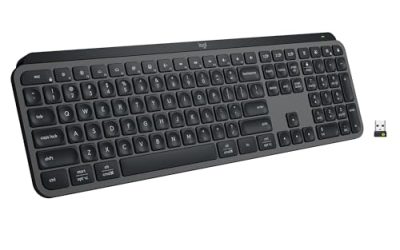
The MX Keys S for Mac is the most complete desk keyboard for a MacBook Pro M1 owner who types all day. It is a full-size board with a Mac key layout, low-profile spherically dished keys and smart backlighting that turns on as your hands approach and adjusts to the room. It pairs with up to three devices over Bluetooth Low Energy, charges over USB-C, and the Logi Options+ app adds Smart Actions that automate repetitive steps with a single keystroke. The Space Grey finish sits neatly beside a MacBook Pro, and the full-size layout means no relearning where the keypad lives.
Watch out for: FileVault may block password entry over Bluetooth at boot, so the laptop keyboard is still needed for that first unlock.
Apple Magic Keyboard with Touch ID and Numeric Keypad, Black Keys
- Best for: M1 owners who dock their MacBook Pro and want Touch ID plus a numeric keypad on the desk.
- Touch ID for fast, easy and secure authentication for logins and to unlock your Mac
- Extended layout with document navigation controls for quick scrolling and full-size arrow keys
- Numeric keypad, ideal for spreadsheets and finance applications
- Wireless Bluetooth connection with a rechargeable battery lasting about a month or more
M1 owners who dock their MacBook Pro and want Touch ID plus a numeric keypad on the desk.
no backlighting and a fixed typing angle, so dim-room typists and anyone who wants an adjustable tilt should look elsewhere.
The Magic Keyboard is the only board here with Touch ID, and it is the natural pick for a MacBook Pro M1 that spends its life docked with the lid closed. It is a full-size wireless keyboard with an extended layout, document navigation controls, full-size arrow keys and a numeric keypad, and the Touch ID sensor sits in the top row for logins, unlocking and Apple Pay. It connects over Bluetooth, charges through a USB-C port with the included woven cable, and the rechargeable battery lasts about a month or more between charges. The black keys on a silver aluminium frame match the MacBook Pro well.
Watch out for: no backlighting and a fixed typing angle, so dim-room typists and anyone who wants an adjustable tilt should look elsewhere.
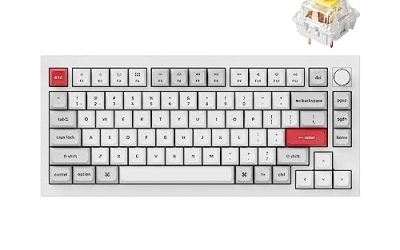
Keychron K2 QMK Wireless Mechanical Keyboard, Version 3
- Best for: M1 owners who prefer mechanical keys, a compact desk and a board they can remap and customise.
- 75 percent layout with 84 keys and a Super Brown switch
- White LED backlight, rechargeable, wired and Bluetooth
- Bluetooth 5.2 connection to up to 3 devices
- QMK firmware with key remapping through the Keychron Launcher web app
M1 owners who prefer mechanical keys, a compact desk and a board they can remap and customise.
no numeric keypad, and this listing has a white LED backlight rather than an RGB version, so check the backlight type before ordering.
The Keychron K2 Version 3 is the compact mechanical pick for M1 owners who want real switch travel without giving up desk space. It is a 75 percent layout with 84 keys, so the function row and arrow keys stay while the numeric keypad goes, and the hot-swappable Super Brown switches can be changed without soldering. It connects to up to three devices over Bluetooth 5.2 or over a wired USB-C connection, supports QMK firmware for remapping keys, and ships with both Mac and Windows keycaps. The white LED backlight and the 4000 mAh battery suit long sessions away from a charger.
Watch out for: no numeric keypad, and this listing has a white LED backlight rather than an RGB version, so check the backlight type before ordering.
Which One Fits Your Situation
You Type All Day at a Desk
Pick the Logitech MX Keys S for Mac. The full-size layout, quiet low-profile keys and smart backlighting are built for long sessions, and three-device Bluetooth switching means the same board follows you from the MacBook Pro M1 to an iPad. USB-C charging keeps the battery topped up without a separate dock. It is the safest all-rounder of the three for anyone whose keyboard is their main work tool.
You Dock Your M1 with the Lid Closed
Pick the Apple Magic Keyboard with Touch ID and Numeric Keypad. With the laptop shut, the built-in Touch ID sensor is out of reach, and this board brings it back to the desk. The full-size layout and numeric keypad suit number-heavy work, and the month-long battery means charging is a rare chore. Just remember it has no backlight, so it suits a well-lit desk better than a dark room.
You Prefer Mechanical Keys and a Compact Desk
Pick the Keychron K2 Version 3. The 75 percent layout frees desk space for a mouse while keeping the function row and arrow keys, and the tactile Super Brown switches give a deliberate press without loud clicks. Hot-swappable sockets and QMK remapping let you change switches and keys as your taste changes, and Bluetooth 5.2 plus a wired mode covers both tidy desks and low-latency sessions.
You Often Type in Dim Rooms
Pick the Logitech MX Keys S for Mac or the Keychron K2 Version 3, both of which have backlit keys. The Logitech board is the stronger choice here: its smart illumination turns on as your hands approach and adapts to the room, so it lights up only when needed. The Magic Keyboard has no backlight, which makes it a poor fit for typing in a dark room.
Common Mistakes
- Buying a Windows-layout keyboard and living with printed labels that do not match macOS, or spending an afternoon remapping keys that a Mac board gets right out of the box.
- Choosing a wired-only keyboard for the 13-inch MacBook Pro M1 and tying up one of its two Thunderbolt ports, when Bluetooth would leave both free for a display and storage.
- Assuming Touch ID works on every Mac: the sensor on an external keyboard only works with Apple silicon Macs, so it suits the M1 but not an older Intel machine.
- Picking a full-size board for a small desk, or a compact board for spreadsheet work, without checking whether the numeric keypad is something you actually use daily.
- Forgetting the FileVault catch: with FileVault enabled, macOS may not accept a Bluetooth keyboard for the first password entry at boot, so the laptop keyboard is still needed at that step.
Frequently Asked Questions
Do these keyboards work with the 13-inch and 14-inch MacBook Pro M1?
Yes. All three connect over Bluetooth to any MacBook Pro M1, and the Keychron also works over a wired USB-C connection. The 13-inch M1 has two Thunderbolt ports, so a Bluetooth board is the tidier choice because it leaves both ports free. Touch ID on the Apple board works with both sizes, since both run Apple silicon.
Does Touch ID on an external keyboard work with the M1?
Yes, Touch ID on an external Magic Keyboard works with Mac models that use Apple silicon, which includes every MacBook Pro M1. The sensor sits in the top row and handles unlocking, logins and Apple Pay, just like the sensor built into the laptop. It does not work with Intel Macs, so the M1 is the dividing line.
Can I use one keyboard with my MacBook Pro M1 and an iPad?
Yes, both the Logitech MX Keys S for Mac and the Keychron K2 Version 3 pair with up to three devices over Bluetooth, so you can switch between a MacBook Pro M1, an iPad and a phone with a keypress. The Apple Magic Keyboard pairs with one Mac at a time, so it is a poorer fit if you switch devices often.
Do I need to install software to use these keyboards?
No, all three work as standard keyboards over Bluetooth or USB-C without extra software, and macOS recognises the Mac layout immediately. The Logitech board gains Smart Actions through the Logi Options+ app, which needs macOS 12 or later, and the Keychron gains remapping through the Keychron Launcher web app. Neither app is required for typing.
FAQ
Do these keyboards work with the 13-inch and 14-inch MacBook Pro M1?
Does Touch ID on an external keyboard work with the M1?
Can I use one keyboard with my MacBook Pro M1 and an iPad?
Do I need to install software to use these keyboards?
More from Amazon
Programs that pair well with the guide above. Offers and eligibility are set by Amazon and may change.
Free shipping on eligible items, Prime Video and more. Eligible new members can start with a free trial.
Start a Prime free trialAd-free music streaming. Eligible new subscribers can start with a free trial.
Try Music Unlimited freeA Prime membership for ages 18-24 with a trial period. Eligibility is set by Amazon.
See Prime for Young AdultsAudiobooks and podcasts to listen to on the go. Eligible new members can start with a free trial.
Try Audible freeAs an Amazon Associate we earn from qualifying purchases.